Web development has changed dramatically over the last few years.
The way developers build websites and applications today is completely different from the way I learned. AI is now part of the normal development workflow, and it is not going anywhere.
That does not mean coding is dead. It does not mean developers are about to disappear. It means the job is evolving.
Whether you are already an experienced developer or you are just starting to learn, you need to understand what modern web development actually looks like, how AI fits into the process, and which skills will still matter over the next five to ten years.
AI Is Now Part of the Normal Development Setup
My current development setup is pretty simple.
On my laptop, I usually have an AI tool open. On my main monitor, I have my text editor. On another screen or browser window, I have the project I am currently building.
That is the modern web development workflow.
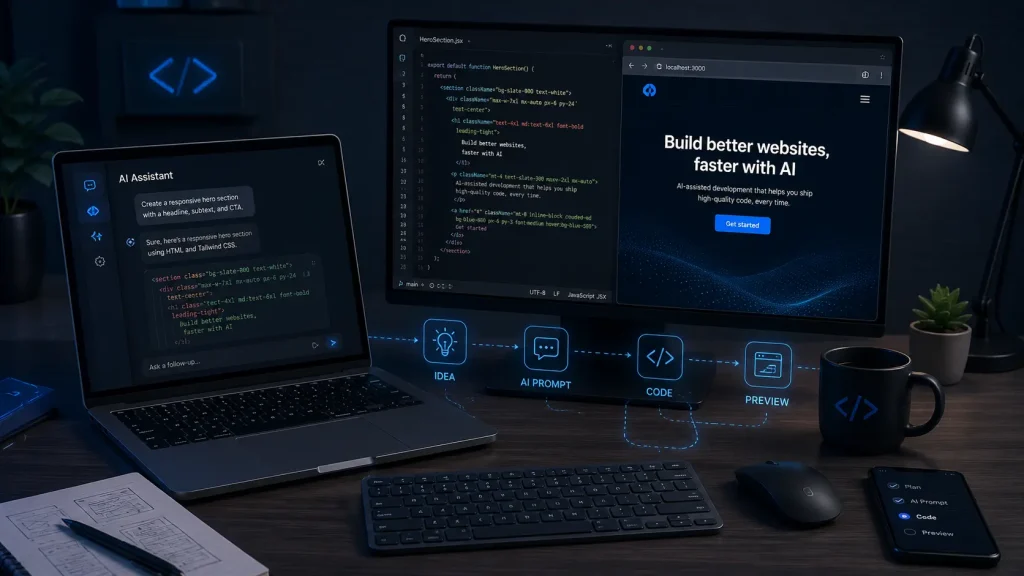
AI is always sitting right there beside me while I work.
I still write code, review code, test projects, fix problems, and make development decisions. However, I spend far less time manually typing every single line from scratch.
Over the last year, I have built very few projects entirely from a blank file.
That does not make me less of a developer. It means I am using the best tools currently available to work faster.
How Developers Solved Problems Before AI
When I first learned web development, tools like this did not exist.
We had books, Udemy courses, YouTube tutorials, documentation, and Stack Overflow. When you got stuck, you either searched for an answer, posted a question, or emailed the instructor who created your course.
Sometimes, I would get stuck on one problem for three or four days.
That was a normal part of learning web development.
Today, AI can often help identify the problem within minutes. You can paste in the relevant code, explain what is happening, and immediately begin working through possible solutions.
You can still get stuck, especially when building something complicated. However, most web development projects reuse the same general functionality.
You create information, read it, update it, and delete it. Developers usually refer to this as CRUD functionality.
The design and business requirements may change, but the underlying programming concepts are often very similar.
A Real Example: Building a Landscaping Website
Let’s say a local landscaping company called Clean and Green needs a new landing page.
Here is how I would approach that project today.
Start With Your Own Code
The first thing I would do is look through my existing projects.
I maintain a repository of websites and applications I have already built. For this project, I might grab the HTML, CSS, and JavaScript from an earlier project, such as an Airbnb-style website.
I am not copying the old website and changing the company name.
I am giving the AI a real example of how I personally structure and organize code.
That distinction is important.
Give the AI a Detailed Prompt
The prompt is one of the most important parts of this process.
I might tell the AI something like:
I want to build a landing page for a landscaping company called Clean and Green. Here is a sample of my HTML, CSS, and JavaScript. Use this code as a reference so the new project follows my coding style and structure.
I would then provide the actual project requirements.
For example, I might ask for:
- A fully mobile-responsive layout
- Professional landscaping images
- A simple company logo
- A list of services
- Clear features and benefits
- Customer testimonials
- Strong calls to action
- A free quote section
- An email lead form
- A mobile navigation menu
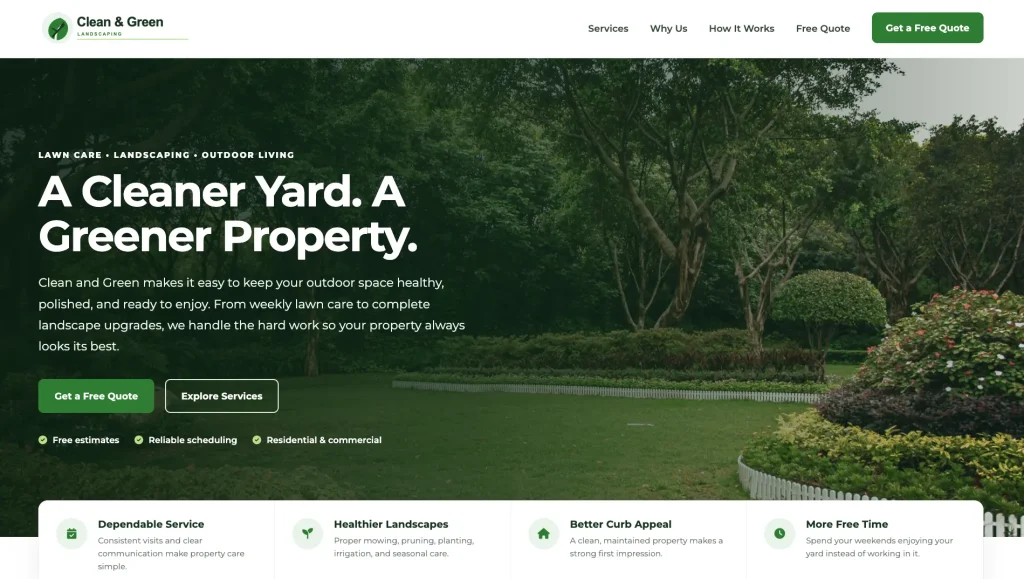
The more specific you are, the more useful the first draft will be.
AI cannot read your mind. You still need to understand the project, determine what the business needs, and clearly communicate those requirements.
Why You Still Need to Learn the Fundamentals
This is the part people do not want to hear.
You still need to learn how to code.
You cannot completely skip HTML, CSS, JavaScript, programming logic, responsive design, databases, and backend development and expect to consistently produce professional work.
AI is a tool for developers. It is not a replacement for understanding what you are building.
You need enough knowledge to review the output and determine whether it is correct. You need to recognize broken layouts, bad code, security problems, unnecessary complexity, and functionality that does not match the client’s request.
You also need to know how to modify the project when the client inevitably asks for something different.
This is why I still believe in learning through projects.
You should not spend six months memorizing definitions or watching endless theory videos. You should learn the fundamentals while building real websites and applications.
Once you understand how development works, AI becomes incredibly powerful.
Without those fundamentals, you are just copying and pasting code you do not understand and you will have no idea how to fix it when it breaks or how to correct AI when it has a brain fart.
Reviewing the AI-Generated Project
With a strong prompt and a useful code sample, AI can generate the first version of a landing page within a few minutes.
What is especially impressive is how closely the output can match my existing coding style.
The HTML structure looks similar to mine. The CSS organization and comments look familiar. Even the JavaScript follows many of the same patterns I normally use.
That is because I gave the AI a real example to follow.
After the project is generated, I review everything.
I check the desktop layout, mobile layout, navigation, buttons, links, forms, spacing, typography, and JavaScript functionality.
In the landscaping example, the generated page might already include:
- Smooth scrolling
- A responsive navigation menu
- A quote request section
- Mobile-friendly layouts
- Service cards
- Calls to action
- Professional imagery
A first draft like that could take several hours to code manually.
Using a modern workflow, I can have something ready to review or demonstrate to a potential client in minutes.
It will probably still need adjustments. The first version is rarely the final version.
However, AI eliminates a massive amount of repetitive setup work.
The Freelancing Cheat Code
This workflow creates an incredible opportunity for freelance developers.
Open Google Maps and search for local businesses in your area.
Look for companies that have strong reviews but either have no website or have an outdated website that does not represent the quality of their work.
Imagine finding a landscaping company with dozens of great reviews but no real website.
Instead of calling the owner and saying, “I build websites,” you can build a simple first draft before contacting them.
Then you can say:
I found your company while looking for local landscaping businesses. You have great reviews, but I noticed you do not currently have a professional website. I put together a quick first draft to show you what one could look like.
That is a much stronger pitch.
You are no longer asking them to imagine what you might create. You are showing them something.
The business owner does not need to know whether the first draft took you 20 minutes or 20 hours. They are not paying for the amount of time you spent typing.
They are paying for the value of having a professional website that can generate leads and help grow their business.
Depending on the project, you might charge a flat fee of $500 to $1,000 or more.
You can also offer ongoing services such as:
- Website hosting
- Maintenance
- Content updates
- Search engine optimization
- Lead form management
- Additional landing pages
- Google Business Profile assistance
This is how developers can make money in 2026.
You combine real development knowledge, AI-assisted production, and the ability to solve business problems.
Build Your Own Code Repository
One of the smartest things a new developer can do is begin building a personal repository of projects.
Every time you create something useful, save it.
Build different types of projects, including:
- Local business landing pages
- Service business websites
- E-commerce layouts
- Contact forms
- Admin dashboards
- Login systems
- CRUD applications
- Booking interfaces
- Blog layouts
- Product pages
Over time, you will develop your own library of layouts, components, functionality, and coding patterns.
You can then use those projects as references for future AI-assisted builds.
This makes the AI more useful because you are no longer asking it to produce a random website using random conventions.
You are teaching it how you build.
Do Not Become a No-Code Coder
There is a major difference between a developer who uses AI and someone who depends entirely on AI.
A real developer understands what the code does.
They can review it, modify it, debug it, and explain it. They understand the project requirements and can recognize when the AI produces something incorrect.
A no-code coder simply copies and pastes whatever the AI generates and hopes that it works.
That approach might be enough to create a basic demo. It is not enough to build reliable projects for real clients or real businesses.
Learn the fundamentals first. Then use AI to increase your speed and productivity.
That combination is extremely powerful.
The Future of Web Development
Coding is not disappearing.
The repetitive parts of coding are becoming faster and more automated, but businesses will still need websites, applications, landing pages, databases, integrations, and custom digital tools.
They will also need people who can understand their problems and turn those problems into working solutions.
The developers who adapt will be able to build more projects in less time.
The developers who refuse to use modern tools may struggle to compete. At the same time, people who rely entirely on AI without learning the fundamentals will eventually hit a wall.
The winning approach is somewhere in the middle.
Learn how web development actually works. Build real projects from scratch. Develop your own coding style. Create a repository of reusable work. Then use AI to move faster.
Do not become a developer who is afraid of AI.
Become a developer who knows how to use the best tools available.